Channel-Packing Textures: Fitting More Into Less Memory
Textures are almost always the largest single consumer of GPU memory in a real-time project. Models compress well, audio streams off disk, but textures sit in VRAM for as long as they're needed — and they add up fast. Channel-packing is one of the highest-leverage techniques available to a technical artist because it doesn't require a single line of code, doesn't change how anything looks, and can shave hundreds of megabytes off your texture budget on a mid-sized project.
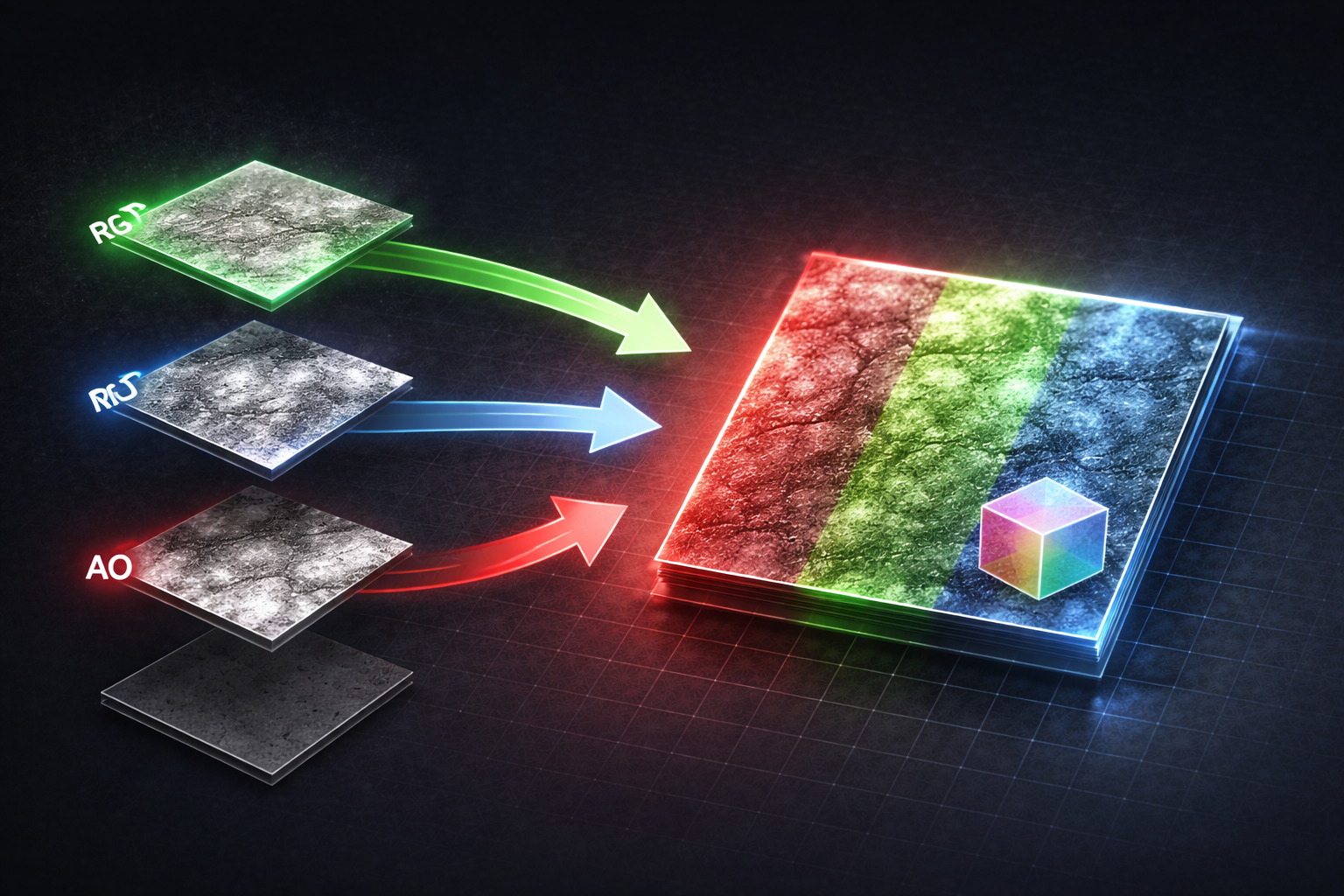
The core idea is simple: most of the data used to describe a surface — roughness, metallic, ambient occlusion, masks of every kind — is greyscale. It has no colour. It's just a single value per pixel, ranging from 0 to 1. Yet if you save each of those maps as a separate texture, you're using a full texture slot for information that could fit in a single channel. Channel-packing means deliberately assigning different greyscale maps to the R, G, and B (and optionally A) channels of a single texture. One texture, four channels, four separate data streams. On the GPU, that single texture costs the same memory as one greyscale texture would — regardless of how many channels you're using.
Why Greyscale Data Is Everywhere in Game Development
Before getting into the packing itself, it's worth stepping back to understand just how much of the data in a typical PBR material is greyscale. Greyscale maps encode a single scalar value per pixel — no hue, no saturation, just brightness. In game development, virtually everything that isn't a colour or a normal is greyscale:
- Roughness — how microscopically rough the surface is (0 = mirror, 1 = fully matte)
- Metallic — whether the surface behaves as a conductor (0 = dielectric, 1 = metal)
- Ambient Occlusion — baked shadowing in crevices, creases, and cavities
- Height / Displacement — surface elevation for parallax effects or tessellation
- Opacity / Alpha masks — which pixels are transparent or cut out entirely
- Emissive masks — which areas of a surface should glow, and at what intensity
- Wetness masks — which areas can accumulate water, puddles, or wet-surface sheen
- Subsurface scatter masks — which areas transmit light (skin, wax, foliage, thin fabric)
- Cavity maps — fine-detail concave shadowing, separate from and complementary to AO
- Effect masks — any custom per-pixel toggle you want to drive from a material (damage, wear, ice, etc.)
Every single one of these is a float in the range 0–1 per pixel. There's no reason any of them need their own dedicated texture. This is the core insight behind channel-packing: if a value has no colour, it belongs in a channel, not its own texture file.
The Memory Maths
A 2048 × 2048 texture compressed with BC1 — the standard format for an RGB texture with no alpha — costs approximately 2 MB in GPU memory.
If you store Roughness, Metallic, and Ambient Occlusion as three separate textures, and compress each individually with BC4 (the single-channel format — also 4 bits per pixel, the same as BC1), you're looking at roughly 2 MB each, so ~6 MB total for those three maps. Pack them into a single RGB texture and compress with BC1: ~2 MB total. That's four megabytes saved on a single material.
That doesn't sound dramatic until you scale it. A mid-sized project with 80 unique material sets, each saving ~4 MB from packing:
80 × 4 MB = ~320 MB recovered
On a console or mobile title where your VRAM budget sits at 1–2 GB total, that's a meaningful chunk. On PC it buys headroom for higher-resolution hero assets where the quality investment is actually visible. There's also a secondary benefit worth noting: texture sample count. Every unique texture in a material costs a sample instruction. Most platforms have a hard limit on how many samples a single material can make. Packing three maps into one texture cuts three samples down to one — which gives you room to do more interesting things in the same material without hitting the ceiling.
ORM: The Industry Standard Pack
The most common packing convention in modern game development is ORM:
- R Ambient Occlusion
- G Roughness
- B Metallic
Why Roughness lives in G
Of the three ORM channels, green has the highest bit precision under BC1 compression. BC1 encodes colour data as RGB 5:6:5 — five bits each for red and blue (32 distinct levels), but six bits for green (64 levels). This isn't arbitrary: human vision is far more sensitive to luminance than to hue, and luminance is weighted heavily towards green, so display hardware and compression formats have historically given it the extra bit. In practice, green can represent smoother gradients with less banding under BC1 than the other two channels — which is exactly why roughness, the map where subtle gradients matter most for specular reflections, is conventionally packed into G. When designing your own custom packs, put your most gradient-sensitive data in the green channel.
Of the three ORM channels, green has the highest bit precision under BC1 compression. BC1 encodes colour data as RGB 5:6:5 — five bits each for red and blue (32 distinct levels), but six bits for green (64 levels). This isn't arbitrary: human vision is far more sensitive to luminance than to hue, and luminance is weighted heavily towards green, so display hardware and compression formats have historically given it the extra bit. In practice, green can represent smoother gradients with less banding under BC1 than the other two channels — which is exactly why roughness, the map where subtle gradients matter most for specular reflections, is conventionally packed into G. When designing your own custom packs, put your most gradient-sensitive data in the green channel.
It's not an official standard, but it's widespread enough that Unreal Engine's default PBR material setup, Substance Painter's Unreal export preset, and the vast majority of asset store content all follow it. If you're establishing a pipeline from scratch, just use ORM — your artists will find documentation and your DCC tools will be pre-configured for it.
In Unreal, unpacking it in the material graph is trivial: break the ORM texture into its channels using a Break Out Float 3 Components node or by plugging the ORM sample into a Component Mask for each channel. Plug R into Ambient Occlusion, G into Roughness, B into Metallic. The visual result is identical to three separate textures. The only change is in VRAM and sampler count.
Choosing the Right Compression Format
The memory saving from packing only holds if you're using the right compression format for the data you've packed. Here's a quick reference for the formats you'll actually encounter:
| Format | Channels | Typical Use | Approx. size (2048²) |
|---|---|---|---|
| BC1 | RGB, no alpha | ORM pack, opaque diffuse | ~2 MB |
| BC3 | RGBA | Diffuse + opacity mask | ~4 MB |
| BC4 | Single channel (R) | Standalone greyscale map | ~2 MB |
| BC5 | Two channels (RG) | Normal maps (B reconstructed in shader) | ~2 MB |
| BC7 | RGBA high quality | Hero diffuse, gradients needing precision | ~4 MB |
For an ORM pack, BC1 is the right call — no alpha needed, good quality for scalar data, smallest footprint for RGB. For a pack that requires four channels (e.g. ORM + emissive mask in alpha), use BC3 or BC7 depending on whether the gradient quality matters. BC1 uses 4:1 compression and can introduce banding artefacts on smooth gradients — if your roughness has subtle falloffs that look blocky after compression, try BC7. It's a larger format, but significantly better quality on gradients.
Beyond ORM: Packing VFX Layers
The same principle extends naturally beyond PBR surface data — it applies anywhere you have multiple greyscale datasets that could share a texture. VFX is a particularly strong use case, especially when you need independent control over different parts of an effect.
In Desert Revenant we built a spawn sigil — a glowing rune that appears on the ground when a character spawns. The sigil had three visually distinct parts that needed to animate independently. The naive approach: three separate textures, one per layer, each driving its own material.
The problem is the same as always — three textures means three material instances, and three material instances means the GPU can't batch them into a single draw call. More state switches, more overhead, every frame the effect is active.
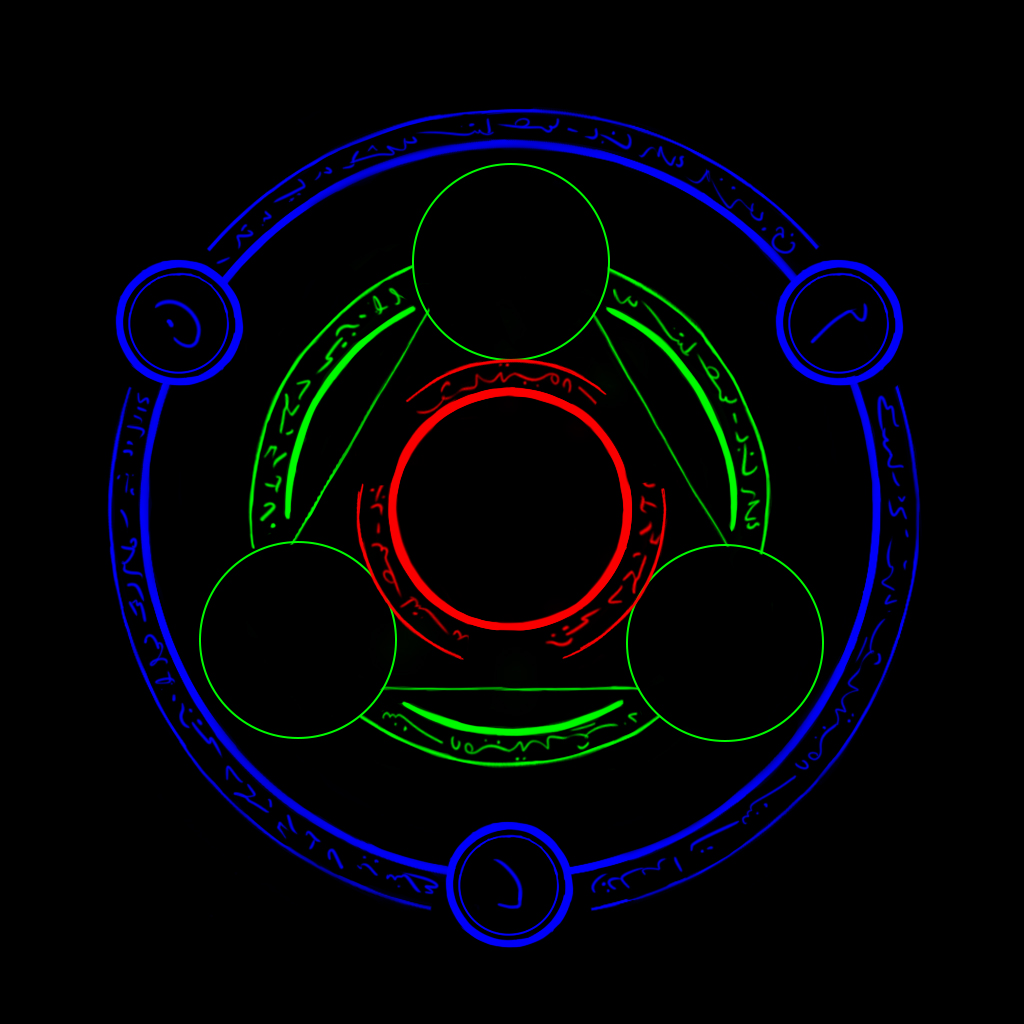
The packed approach: export all three sigil layers into the R, G, and B channels of a single RGB texture. All three parts live in one texture, driven by one material. In the material graph, each channel drives its own set of parameters — timing offsets, emissive colour, opacity — so each part of the sigil animates on its own schedule while the renderer still sees one material and one draw call.
Any layered VFX where the layers are greyscale masks — sigils, rune circles, spell indicators, decal overlays — is a candidate for this treatment. Three textures become one, three draw calls become one, and you gain per-channel parameter control that a multi-material approach would never give you cleanly.
Takeaways
- Most PBR surface data is greyscale — roughness, metallic, AO, masks, and more are all single-channel values with no colour information
- ORM packing (AO → R, Roughness → G, Metallic → B) is the widely-adopted convention; use it by default across all new projects
- A single 2048² ORM texture (BC1) replaces three separate maps at the same or lower memory cost — roughly four megabytes saved per material versus three separate BC4 textures
- On a project with 80+ material sets, that adds up to ~320 MB recovered with zero visual change
- Beyond ORM, any greyscale data — emissive masks, wetness, damage, sway intensity — is a candidate for packing
- Choose BC1 for RGB packs, BC4 for standalone greyscale, BC7 when you need higher quality on gradients or fine detail
- Beyond ORM, the same technique applies to layered VFX — packing multiple greyscale masks into RGB channels gives you independent per-channel control while keeping everything on a single material and a single draw call
Found this useful? Share it: